7 Best Free Social Media Management Tools in 2026
Most "free" social media management tools come with a catch. The post limits are so low they're impractical, the free plan is actually a 14-day trial, or the features are so stripped down you can't get real work done.
I tested every major free social media management tool to find the ones that actually let you manage accounts without paying. Here are the 7 best free social media management tools that deliver real value in 2026.
What "Free" Actually Means
Before the list, a quick clarification. There are three types of "free" in this space.
Genuinely free plans that you can use indefinitely with real features. Buffer and Publer fall into this category.
Free trials that give you full access for 14-30 days, then require payment. OmniSocials and SocialBee use this model. These are useful for testing, but they're not permanently free.
Freemium plans with hard limits that push you to upgrade quickly. Most tools fall here.
This list includes all three types, clearly labeled so you know what you're getting.
Quick Comparison: Free Social Media Management Tools
| Tool | Free Plan Type | Channels | Post Limit | Analytics | Social Inbox |
|---|---|---|---|---|---|
| Buffer | Permanent free | 3 | 10/channel | Basic | No |
| OmniSocials | 14-day trial | 11 | Unlimited | Yes | Yes |
| Publer | Permanent free | 3 | 10/account | Basic | No |
| Pallyy | Permanent free | 1 set | 15/month | Basic | Yes |
| Canva | Permanent free | Limited | Limited | No | No |
| Metricool | Permanent free | 1 brand | 50/month | Yes | No |
| Planable | Permanent free | Unlimited | 50 total | No | No |
1. Buffer: Best Free Social Media Management Tool Overall
[Screenshot: Buffer free plan scheduling interface]
Buffer is the best free social media management tool for most people.
The free plan gives you 3 channels with 10 scheduled posts per channel. No credit card required, no trial that expires. You can use it indefinitely.
The interface is the cleanest in the category. Pick a platform, write your post, set a time. Done. The AI assistant helps with captions, and the browser extension lets you share content quickly.
The catch: 10 posts per channel is enough for casual posting (2-3 per week). If you post daily, you'll hit the limit. And the free plan has almost no analytics.
What you get free:
- 3 channels (Instagram, Facebook, LinkedIn, TikTok, X, etc.)
- 10 scheduled posts per channel
- AI assistant for captions
- Browser extension
- Basic publishing tools
What you don't get:
- Analytics (almost none on free)
- Social inbox
- Approval workflows
- More than 3 channels
Best for: Solo creators posting 2-3 times per week on up to 3 platforms.
2. OmniSocials: Best Free Trial (Full Features, 11 Platforms)
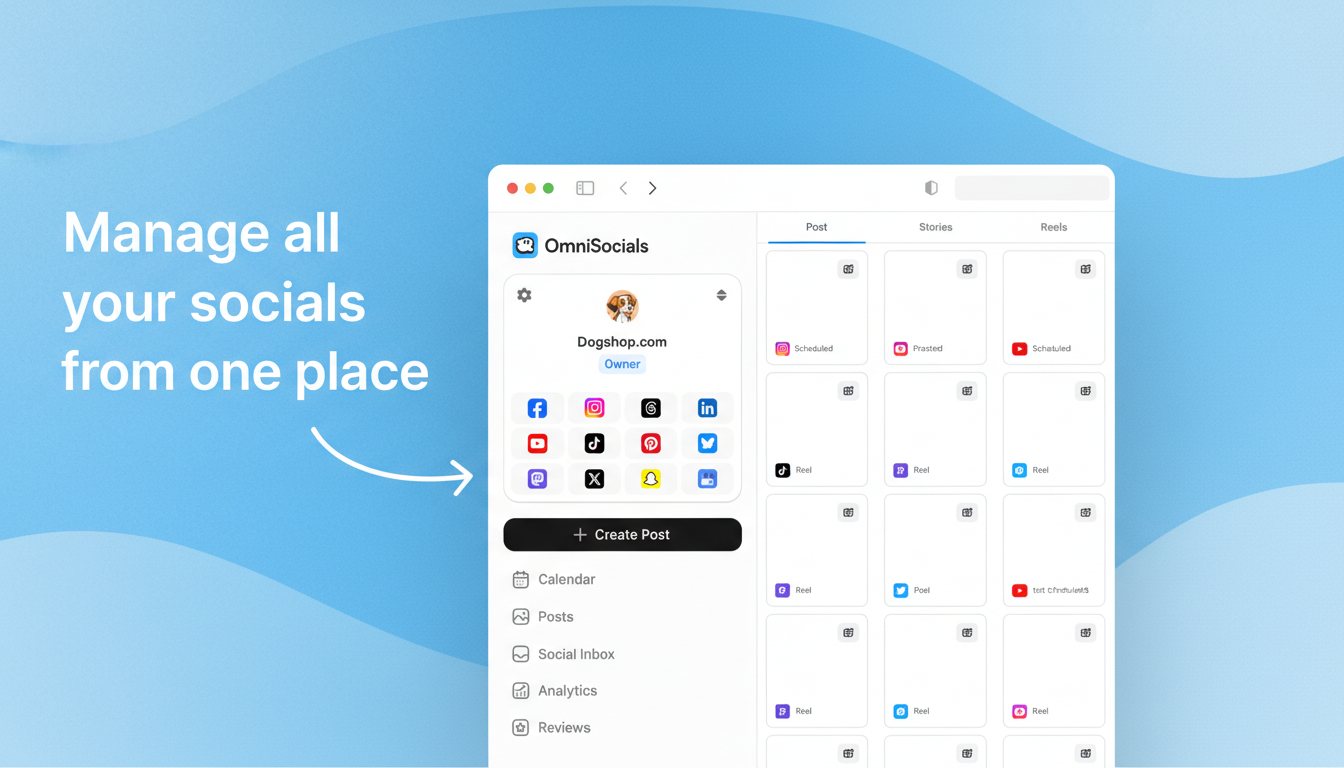
[Screenshot: OmniSocials trial dashboard with all 11 platforms connected]
OmniSocials isn't permanently free, but the 14-day free trial gives you more functionality than any free plan on this list.
During the trial, you get full access to all features: 11 platforms, unlimited posts, social inbox, approval workflows, visual editor, and media library. No features are restricted.
If you're evaluating tools, the OmniSocials trial lets you test everything at full capacity before committing to $10/mo. That's less than Buffer costs for 2 channels on its paid plan.
What you get free (14 days):
- 11 platforms including Bluesky, Threads, and Mastodon
- Unlimited scheduled posts
- Unified social inbox
- Approval workflows
- Visual post editor with per-platform preview
- Media library with Pexels and Unsplash
After the trial: $10/mo (annual) or $12/mo (monthly). No per-channel fees.
Best for: Anyone testing tools before committing, and teams that want to compare full-featured scheduling at a low price. For more scheduling options, see our social media planner guide.
3. Publer: Best Free Plan with Analytics and Link-in-Bio
[Screenshot: Publer free plan dashboard with analytics overview]
Publer has the most feature-rich free plan in this category.
You get 3 accounts with 10 posts each, which matches Buffer's free tier. But Publer adds basic analytics, a link-in-bio tool, and auto-scheduling with optimal time suggestions. Those are features Buffer charges for.
Google Business Profile support on the free plan is another win. If you run a local business and want to keep your GBP active, Publer is the only free tool that covers it.
What you get free:
- 3 social accounts (all major platforms + GBP)
- 10 scheduled posts per account
- Basic analytics and reporting
- Link-in-bio page builder
- Auto-scheduling with best-time suggestions
- AI Assist for captions
What you don't get:
- Bulk upload (paid only)
- Unlimited scheduling
- Social inbox
- Team collaboration features
Best for: Budget-conscious users who want analytics and link-in-bio without paying.
4. Pallyy: Best Free Visual Planner with Social Inbox
[Screenshot: Pallyy free plan with visual grid planner and inbox]
Pallyy is the only free social media management tool that includes both a visual feed planner and a social inbox.
The free plan gives you 1 social set with 15 posts per month. You get the Instagram grid preview, drag-and-drop content calendar, and a social inbox for comments and DMs. That's a combination no other free tool offers.
15 posts per month is enough for creators posting 3-4 times per week on one platform. The visual planning tools make those posts count by helping you maintain a consistent feed aesthetic.
What you get free:
- 1 social set (1 profile per platform)
- 15 posts per month
- Visual feed planner with Instagram grid preview
- Social inbox for comments and DMs
- Basic analytics
What you don't get:
- More than 1 social set
- Post recycling
- Advanced analytics
- AI features
Best for: Visual creators who want Instagram grid planning and inbox management at no cost.
5. Canva: Best Free Design Tool with Basic Scheduling
[Screenshot: Canva social media content calendar with template library]
Canva is primarily a design tool, but its free plan includes a basic social media scheduler.
The Canva Content Planner lets you schedule posts directly from the design editor. Create a graphic using Canva's templates, then schedule it to Instagram, Facebook, LinkedIn, X, Pinterest, or TikTok without leaving the app.
The scheduling features are basic: no social inbox, no analytics, no bulk upload. But if you already use Canva for design, adding scheduling keeps your workflow in one place.
What you get free:
- Social media post templates (thousands available)
- Basic scheduling to major platforms
- Design-to-publish workflow
- Stock photos, icons, and fonts
What you don't get:
- Advanced scheduling features
- Analytics or reporting
- Social inbox
- Team collaboration on scheduling
Best for: Creators already using Canva for design who want to schedule directly from the editor.
6. Metricool: Best Free Analytics for Social Media
[Screenshot: Metricool analytics dashboard with cross-platform metrics]
Metricool is the best free social media management tool if analytics matter more to you than post volume.
The free plan supports 1 brand with 50 posts per month and includes cross-platform analytics. That's more posts than Buffer or Publer's free plans, and the analytics are genuinely useful, not just surface-level vanity metrics.
You get follower growth tracking, engagement rates, best-time-to-post data, and competitor analysis on the free tier. No other free tool includes competitor tracking.
What you get free:
- 1 brand across major platforms
- 50 posts per month
- Cross-platform analytics and reporting
- Best-time-to-post suggestions
- Competitor analysis (basic)
- Hashtag tracking
What you don't get:
- More than 1 brand
- Social inbox
- Bulk scheduling
- Team features
Best for: Solo marketers who want analytics-driven posting decisions at no cost.
7. Planable: Best Free Plan for Team Collaboration
[Screenshot: Planable free plan with post preview and team comments]
Planable offers a different kind of free plan: 50 total posts with no time limit. Unlike most free plans that reset monthly, Planable's 50 posts are cumulative. Use them over a week or a year.
The visual post previews and team collaboration features work on the free plan. Every post shows exactly how it will look on each platform. Team members can comment and approve, even on free.
50 posts won't last forever if you post frequently, but it's enough to test whether Planable's approval workflow fits your team before committing to $39/workspace/month.
What you get free:
- 50 total posts (no monthly reset)
- Unlimited workspaces and users
- Visual post previews for every platform
- Team comments and collaboration
- Content calendar
What you don't get:
- Posts beyond 50 total
- Analytics (paid add-on)
- Engagement management (paid add-on)
- Approval workflows beyond basic
Best for: Teams testing collaboration and approval workflows before committing to a paid plan.
Free vs. Cheap: When to Upgrade
Free tools work for basic scheduling needs. But there's a clear point where upgrading makes sense.
Stay on free if: You manage 1-3 platforms, post a few times per week, and don't need analytics or a social inbox.
Upgrade when: You manage 4+ platforms, post daily, need analytics, or want a social inbox. At that point, OmniSocials at $10/mo for 11 platforms is cheaper than cobbling together multiple free tools. For a full rundown, check our guide to the best free social media schedulers.
The real cost of "free" is often time. Using three different free tools to cover what one $10/mo tool does creates friction, costs hours, and fragments your analytics. Factor in the value of your time when making the decision.
Ready to upgrade? Try OmniSocials free for 14 days and see what 11 platforms for $10/mo looks like.
Frequently Asked Questions
What is the best free social media management tool?
Buffer is the best free social media management tool for most people. The free plan supports 3 channels with 10 scheduled posts per channel and a clean, simple interface. Publer is a close second with 3 accounts, basic analytics, and a link-in-bio tool included free.
Are free social media tools worth using?
Yes, for small accounts and solo creators managing 1-3 platforms. Free tools like Buffer and Publer cover basic scheduling. The main limitations are post volume, connected accounts, and analytics depth. If you manage more than 3 platforms or post daily, a paid tool like OmniSocials ($10/mo) gives you significantly more capacity.
Which free social media tools include analytics?
Metricool offers the best free analytics with cross-platform reporting for 1 brand. Publer includes basic analytics on its free plan. Buffer's free plan has almost no analytics. For deeper reporting at a low cost, OmniSocials ($10/mo) and SocialBee ($29/mo) include comprehensive analytics.
Can I manage all my social media for free?
You can manage up to 3 platforms for free using Buffer or Publer. For more platforms, the cheapest full-featured option is OmniSocials at $10/month for 11 platforms. Truly managing 5+ platforms for free requires combining multiple tools, which creates more work than it saves.