9 Best Social Media Analytics Tools in 2026 (Free and Paid)
You can't improve what you don't measure. But logging into five different platforms to check your numbers? That's not analytics. That's a chore.
The right social media analytics tools pull all your data into one place, show you what's working, and help you make better decisions about where to spend your time. The wrong tool buries useful data behind confusing dashboards or charges you $200/mo for metrics you can get for free.
I've spent the past month testing 9 social media analytics tools across multiple accounts, comparing their reporting depth, usability, pricing, and the specific metrics that matter for growing a real audience in 2026.
Here's what I found.
What Makes a Good Social Media Analytics Tool?
The best social media analytics tools do three things well: collect data from all your platforms, present it clearly, and help you act on it. Most tools nail one or two of these. Few get all three right.
Here's what I evaluated for each tool on this list.
Cross-platform coverage. If you're active on Instagram, LinkedIn, TikTok, and YouTube, your analytics tool needs to support all four. Tools that only cover 2-3 platforms force you to check native dashboards for the rest. Pairing your analytics tool with a scheduling tool that handles the same platforms is what makes social media automation actually work end to end.
Reporting depth. Some tools show basic engagement metrics (likes, comments, shares) and call it a day. Better tools break down engagement rate by post type, track audience demographics over time, and let you build custom reports for clients or stakeholders.
Competitive benchmarking. Knowing your own numbers is useful. Knowing how they compare to competitors and industry averages is more useful. Not every tool includes this, and the ones that do vary widely in depth.
Usability. An analytics dashboard that takes 20 minutes to navigate is worse than checking each platform natively. The data should be accessible within a few clicks.
Price relative to value. Sprout Social has the deepest analytics on this list, but at $199/seat/mo it's built for enterprise budgets. Several tools deliver 80% of that value at 10% of the cost.
Quick Comparison: All 9 Social Media Analytics Tools
| Tool | Starting Price | Best For | Platforms | Free Option |
|---|---|---|---|---|
| Sprout Social | $199/seat/mo | Deepest analytics overall | 8+ | 30-day trial |
| OmniSocials | $10/mo | Best value analytics | 11 | 14-day trial |
| Hootsuite | $99/mo | Teams & collaboration | 10 | None |
| Buffer | Free/$5/ch | Simple free analytics | 8 | Yes (3 channels) |
| Socialinsider | $99/mo | Competitive analysis | 8+ | 14-day trial |
| Iconosquare | $49/mo | Instagram & TikTok analytics | 6 | 14-day trial |
| Metricool | Free/$18/mo | Free multi-platform analytics | 9+ | Yes (1 brand) |
| Keyhole | $63/mo | Hashtag & campaign tracking | 6+ | Free trial |
| Brandwatch | Custom pricing | Enterprise social listening | 10+ | Demo only |
Now let's break down each tool.
1. Sprout Social: Best Social Media Analytics Overall
[Screenshot: Sprout Social analytics dashboard with cross-channel performance report]
Sprout Social has the most powerful analytics suite of any tool on this list. If analytics depth is your top priority, and you have the budget for it, nothing else comes close.
The cross-channel reporting lets you pull data from every connected platform into a single report. Instagram engagement, LinkedIn impressions, TikTok views, YouTube performance, all in one dashboard with consistent formatting and clear visualizations.
What sets Sprout Social apart is the competitive benchmarking. You can track competitors' public profiles, compare your engagement rate against theirs, and see where you're gaining or losing ground. Most tools either don't offer this or limit it to surface-level follower counts.
The custom reporting is genuinely presentation-ready. Build PDF reports with your branding, choose which metrics to include, and schedule automatic delivery to clients or leadership. I've used other tools' "custom" reports before. Sprout's are the only ones I'd send to a C-suite without reformatting.
Sentiment analysis adds another layer. Sprout scans your mentions and comments to gauge whether conversations about your brand are positive, negative, or neutral. Combined with their social listening features, you can spot PR problems before they escalate.
Key features:
- Cross-channel analytics with unified reporting
- Competitive benchmarking against industry peers and competitors
- Custom branded reports with scheduled delivery
- Sentiment analysis and social listening
- Post-level performance tracking with optimal time suggestions
- Team performance metrics and task reporting
Pros:
- Deepest analytics and reporting on the market
- Competitive benchmarking is genuinely useful for strategy
- Reports are polished enough to share with clients or executives
- Social listening catches brand mentions you'd otherwise miss
- CRM integrations (Salesforce, HubSpot) connect social to sales data
Cons:
- $199/seat/mo is prohibitively expensive for small teams
- Per-seat pricing means costs scale fast with team size
- The learning curve is steeper than simpler tools
- Many analytics features are locked behind the Advanced plan ($399/seat/mo)
- Annual contracts can be rigid
Pricing: From $199/seat/mo (Standard plan). Advanced plan at $399/seat/mo includes competitive benchmarking and social listening. 30-day free trial.
Verdict: Sprout Social is the gold standard for social media analytics. The reporting depth, competitive benchmarking, and sentiment analysis are things no mid-range tool can replicate. But the price tag means it only makes sense for brands with dedicated social media budgets. If $200+/mo per user is out of range, keep reading.
2. OmniSocials: Best Value Social Media Analytics
[Screenshot: OmniSocials unified analytics dashboard with multi-platform performance overview]
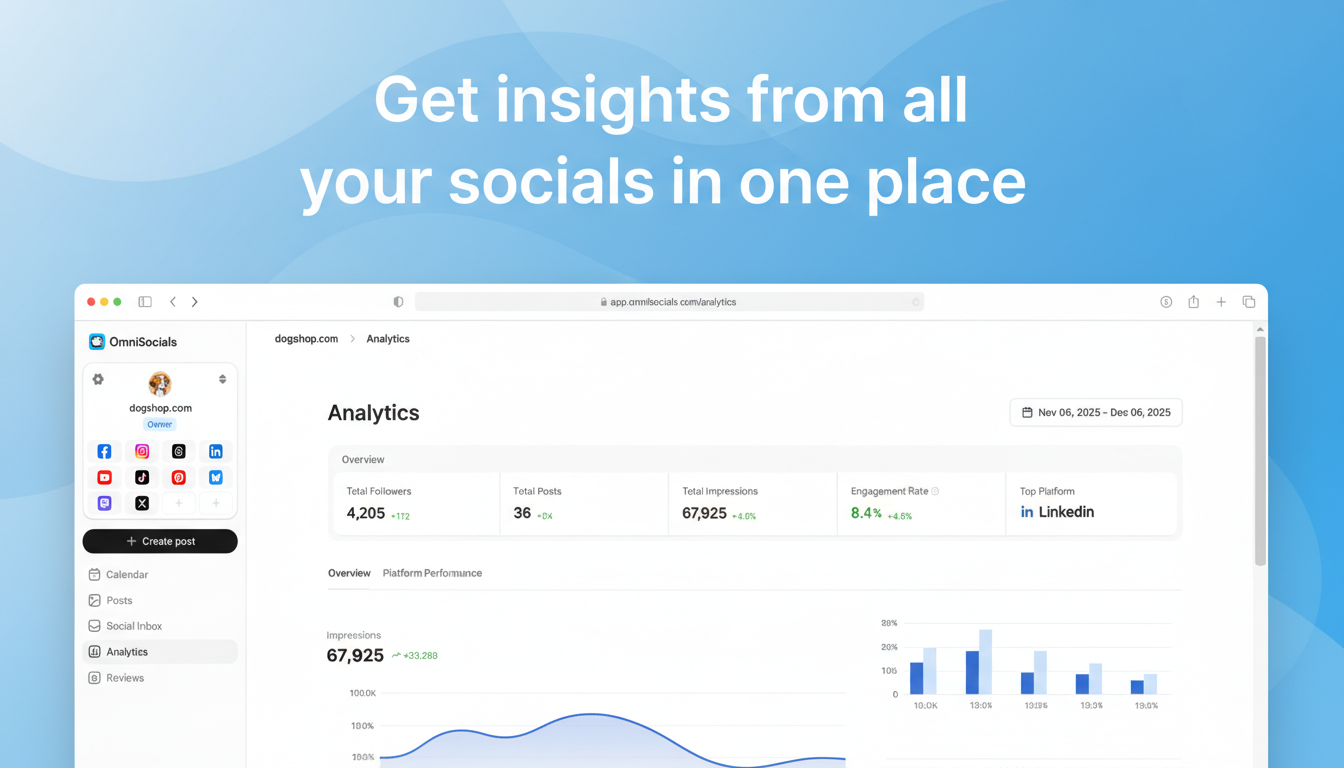
OmniSocials won't beat Sprout Social on analytics depth. That's not the point. The point is that you get solid, usable analytics across 11 platforms for $10/mo. That's a fraction of what most tools charge.
The analytics dashboard pulls data from Instagram, Facebook, LinkedIn, YouTube, TikTok, X, Pinterest, Bluesky, Threads, Mastodon, and Google Business Profile into a single view. You can see engagement rates, follower growth, post performance, and reach across all platforms without switching tabs.
What I particularly like about OmniSocials' analytics is the clarity. The dashboards aren't overloaded with 50 metrics you'll never use. You get the numbers that matter: which posts performed best, when your audience is most active, how your engagement rate trends over time, and which platforms are driving the most results.
Reporting is straightforward. Export your data, review performance by platform or by time period, and track growth trends. It won't build you a 40-page branded PDF like Sprout Social, but for most small businesses and creators, you don't need that.
The real value proposition is everything else you get alongside analytics. Scheduling, a unified social inbox for DMs and comments, a media library, approval workflows. All included at $10/mo. With most other tools on this list, analytics alone costs more than OmniSocials' entire platform.
Key features:
- Unified analytics across 11 platforms
- Engagement rate and follower growth tracking
- Best-performing post identification
- Audience activity and optimal posting time data
- Platform-by-platform performance comparison
- Full scheduling, inbox, and media library included
Pros:
- 11-platform coverage at $10/mo is unmatched value
- Clean, easy-to-read dashboards that don't overwhelm
- Analytics come bundled with scheduling, inbox, and more
- No per-channel or per-seat fees
- Supports platforms most analytics tools skip (Bluesky, Mastodon, Threads)
Cons:
- Analytics are basic compared to Sprout Social or Socialinsider
- No competitive benchmarking or sentiment analysis
- Custom reporting options are limited
- Newer platform with a smaller user community
- No social listening features
Pricing: $10/mo (annual) or $12/mo (monthly). 14-day free trial.
Verdict: OmniSocials is the best pick if you want analytics and a full social media management platform without enterprise pricing. You won't get competitive benchmarking or sentiment analysis, but you'll get clear, actionable data across more platforms than almost any competitor, at a price that won't make you wince.
Want to see your analytics across all 11 platforms? Try OmniSocials free for 14 days.
3. Hootsuite: Best Social Media Analytics for Teams
[Screenshot: Hootsuite analytics dashboard with team performance metrics]
Hootsuite is the most well-known name in social media management, and its analytics features are built for teams that need collaborative reporting.
At $99/mo for the Professional plan, Hootsuite's analytics cover 10 social accounts with custom reporting, team performance tracking, and best-time-to-post recommendations based on your historical data. The analytics aren't as deep as Sprout Social's, but they're more than adequate for most businesses.
Team performance tracking is where Hootsuite stands out. If you have multiple people managing social accounts, you can track response times, assignment completion, and individual contribution metrics. This is useful for agencies and in-house teams that need accountability data.
OwlyWriter AI generates content suggestions based on your past performance data. It analyzes which posts got the most engagement and recommends similar formats, topics, and posting times. It's a neat bridge between analytics and action.
The custom reporting lets you build reports from individual metrics, choose visualizations, and schedule automated delivery. Not as polished as Sprout Social's reports, but functional enough for client and stakeholder reporting.
Key features:
- Custom analytics reports with automated scheduling
- Team performance tracking and response time metrics
- OwlyWriter AI content recommendations based on performance data
- Best time to post suggestions
- Social listening on Advanced plan ($249/mo)
- ROI tracking on higher-tier plans
Pros:
- Strong team performance and collaboration analytics
- Custom reports are flexible and automatable
- OwlyWriter AI connects analytics insights to content creation
- Large integration ecosystem for pulling in external data
- Established platform with extensive documentation
Cons:
- $99/mo starting price is steep for solo users
- No free plan (removed in 2023)
- Interface feels dated compared to modern alternatives
- Best analytics features require the Advanced ($249/mo) or Enterprise plan
- Social listening costs extra on most plans
Pricing: From $99/mo (Professional plan). Advanced plan at $249/mo for social listening and advanced analytics. No free plan. 30-day trial available.
Verdict: Hootsuite is a solid choice if your team needs collaborative analytics with individual performance tracking. Solo users and small teams will find better value elsewhere. For a deeper look at what you're paying for, check our Hootsuite pricing analysis.
4. Buffer: Best Free Social Media Analytics
[Screenshot: Buffer analytics dashboard showing engagement rate per post]
Buffer offers the cleanest, simplest analytics experience on this list. If you want basic performance data without complexity, Buffer delivers.
The free plan gives you analytics for up to 3 channels. You can track engagement rate, reach, impressions, and follower growth for each post. The data is presented in a clean interface that anyone can understand without training.
On the paid plans (starting at $5/channel/mo), you get deeper analytics including audience demographics, post comparison tools, and CSV exports. The engagement rate tracking is particularly well done. Buffer calculates engagement rate per post and shows you trends over time, which helps you spot what content formats work best.
Buffer's analytics won't give you competitive benchmarking, sentiment analysis, or cross-channel reports. But for a free tool, or even at $5/channel, the clarity of the data presentation is hard to beat.
Key features:
- Free analytics for 3 channels
- Per-post engagement rate tracking
- Audience demographics on paid plans
- Post performance comparison tools
- CSV data exports
- Instagram Stories analytics
Pros:
- Genuinely useful free analytics tier
- Cleanest, most intuitive analytics interface
- Engagement rate tracking helps identify winning content
- Simple enough that anyone on your team can use it
- Stories analytics included on paid plans
Cons:
- Per-channel pricing adds up fast (5 channels = $25/mo, 10 = $50/mo)
- No cross-platform reporting or unified dashboards
- No competitive benchmarking
- Free plan analytics are limited to basic metrics
- No social listening or sentiment analysis
Pricing: Free (3 channels with basic analytics) / Essentials from $5/channel/mo with expanded analytics.
Verdict: Buffer is the best option if you want clean, simple analytics at no cost for a few channels. The interface is best-in-class for readability. Just be aware that scaling past 3-4 channels pushes the per-channel pricing into territory where flat-rate tools offer more value.
5. Socialinsider: Best for Competitive Analysis
[Screenshot: Socialinsider competitive benchmarking dashboard with side-by-side brand comparison]
Socialinsider is purpose-built for one thing: understanding how your social media performance compares to your competitors. If competitive benchmarking is what you need, this is the specialist tool.
At $99/mo, Socialinsider lets you add competitor profiles and track their performance alongside yours. You can compare engagement rates, posting frequency, audience growth, content types, and top-performing posts. The side-by-side comparisons make it easy to spot gaps in your strategy.
Industry benchmarking goes beyond individual competitors. Socialinsider maintains databases of average performance metrics across industries, so you can see how your numbers stack up against your sector as a whole. This context is valuable when reporting to clients or leadership who want to know "Are these results good?"
The content analysis breaks down competitor posts by type (video, carousel, image, text) and shows which formats drive the most engagement in your niche. This is data you can act on immediately.
Campaign tracking lets you group posts by campaign or hashtag and measure collective performance. Useful for agencies reporting on specific initiatives.
Key features:
- Side-by-side competitor analytics
- Industry benchmarking with sector averages
- Content type performance analysis
- Campaign tracking and grouping
- Cross-platform analytics (Instagram, Facebook, TikTok, YouTube, LinkedIn, X)
- Automated PDF reporting
Pros:
- Best competitive benchmarking of any tool at this price point
- Industry averages give context to raw numbers
- Content type analysis is directly actionable
- Automated reports save time for agencies
- Clean, modern interface
Cons:
- $99/mo is expensive if you don't need competitor tracking
- Not a full social media management tool (no scheduling or inbox)
- Platform coverage is narrower than all-in-one tools
- Profile limits on lower plans can be restrictive
- No social listening or sentiment analysis
Pricing: From $99/mo. 14-day free trial.
Verdict: Socialinsider is the right tool if "How do we compare to competitors?" is a question you need to answer regularly. For pure competitive analytics, it outperforms tools that are 2x the price. If you need scheduling and inbox alongside analytics, pair it with a management tool like OmniSocials or use an all-in-one platform instead.
6. Iconosquare: Best for Instagram and TikTok Analytics
[Screenshot: Iconosquare Instagram analytics with audience demographics and content performance]
Iconosquare is the analytics specialist for visual platforms. If Instagram and TikTok are your primary channels, Iconosquare's depth on those platforms exceeds what most general-purpose tools offer.
At $49/mo, you get Instagram analytics that go well beyond what Instagram Insights provides natively. Audience demographics by location, age, and gender. Optimal posting times calculated from your actual engagement data. Hashtag performance tracking. Stories and Reels analytics with retention rates.
TikTok analytics are equally detailed. View count trends, engagement by video length, audience growth analysis, and best posting time calculations. For creators who post multiple TikToks per week, this data is genuinely useful for optimizing output.
The content performance breakdowns let you filter by content type (Reels vs. carousel vs. single image on Instagram, for example) and see which format your audience prefers. This is the kind of granular data that helps you stop guessing and start producing more of what works.
Key features:
- Deep Instagram analytics (feed, Stories, Reels)
- TikTok analytics with video performance tracking
- Audience demographics and activity tracking
- Hashtag performance monitoring
- Content type performance comparison
- Automated reporting and competitor tracking
Pros:
- Deepest Instagram and TikTok analytics in the mid-range category
- Audience insights go beyond native platform analytics
- Hashtag tracking helps refine discoverability strategy
- Content type analysis is specific and actionable
- Scheduling included alongside analytics
Cons:
- $49/mo is steep if you also need a separate scheduling tool for other platforms
- Strongest on Instagram/TikTok, weaker on LinkedIn, X, and others
- Competitor tracking is limited compared to Socialinsider
- Facebook analytics feel like an afterthought
- No social listening
Pricing: From $49/mo (Pro plan). 14-day free trial.
Verdict: If Instagram and TikTok drive your business, Iconosquare's analytics are worth the investment. The depth on visual platforms is noticeably better than what general tools provide. For broader platform coverage, you'll need a complementary tool.
7. Metricool: Best Free Social Media Analytics Tool
[Screenshot: Metricool analytics dashboard with multi-platform overview and engagement metrics]
Metricool has the most generous free plan of any analytics tool on this list. If you're just getting started with social media analytics and don't want to pay until you need to, start here.
The free plan covers one brand with analytics across Instagram, Facebook, TikTok, X, LinkedIn, Pinterest, YouTube, Twitch, and Google Business Profile. That's 9+ platforms at zero cost. You get 90 days of historical data, scheduling for 50 posts/month, and basic competitor analytics for one competitor.
At those terms, Metricool's free tier is more useful than Buffer's free plan (3 channels, limited analytics) and competitive with paid plans from other tools.
On the paid plans (starting at $18/mo), you unlock unlimited scheduling, 2+ years of data history, more competitor profiles, and team collaboration. The Starter plan at $18/mo covers up to 5 brands, which makes it attractive for freelancers managing a few clients.
The analytics dashboard is clean and well-organized. You get engagement metrics, follower growth, best posting times, and content performance across all connected platforms. The data isn't as deep as Sprout Social or Socialinsider, but it covers the fundamentals well.
Key features:
- Free plan with 9+ platform analytics
- Competitor tracking (1 free, more on paid plans)
- Best time to post recommendations
- Content performance by type and platform
- Hashtag analytics
- Ad analytics for Facebook, Instagram, and Google Ads
Pros:
- Most generous free analytics plan available
- Covers 9+ platforms at no cost
- Ad analytics for paid campaigns included
- Clean, modern interface
- Affordable paid plans starting at $18/mo
Cons:
- Free plan limited to 90 days of data history
- Reporting depth is surface-level compared to premium tools
- Competitor tracking limited to 1 profile on free plan
- Customer support is slower on the free tier
- No social listening or sentiment analysis
Pricing: Free (1 brand, 9+ platforms) / Starter from $18/mo (5 brands). Higher tiers for agencies and enterprises.
Verdict: Metricool is the best starting point for anyone who wants cross-platform analytics without paying. The free plan is genuinely useful, not a teaser. When you outgrow it, the paid plans are reasonably priced.
8. Keyhole: Best for Hashtag and Campaign Tracking
[Screenshot: Keyhole real-time hashtag tracking dashboard with engagement metrics and word cloud]
Keyhole specializes in something most analytics tools treat as an afterthought: hashtag tracking and campaign measurement.
At $63/mo, Keyhole gives you real-time analytics for any hashtag, keyword, or account across Instagram, X, TikTok, YouTube, and Facebook. Track a branded hashtag, monitor a campaign launch, or follow an industry conversation, all with live-updating dashboards.
The campaign tracking is where Keyhole shines brightest. Create a campaign, define the hashtags and accounts associated with it, and Keyhole aggregates all the data into a single report. Reach, impressions, engagement, top contributors, sentiment, geographic distribution. For brands running hashtag campaigns or influencer partnerships, this data is hard to get from any other tool.
Influencer tracking lets you monitor the reach and engagement of influencers who mention your brand or participate in your campaigns. You can see which influencers drive the most engagement and which ones underperform.
Key features:
- Real-time hashtag tracking and analytics
- Campaign measurement with unified reporting
- Influencer tracking and performance measurement
- Keyword monitoring across platforms
- Automated reporting with white-label options
- Historical hashtag data
Pros:
- Best hashtag analytics of any tool on this list
- Campaign tracking consolidates scattered data into actionable reports
- Real-time monitoring catches trends as they happen
- Influencer performance tracking is useful for partnerships
- White-label reports for agency use
Cons:
- $63/mo is expensive for a specialized tool
- Not a full social media management platform (no scheduling or inbox)
- Platform coverage is narrower than all-in-one tools
- Pricing jumps significantly for higher-volume tracking
- Less useful if you don't run hashtag-driven campaigns
Pricing: From $63/mo. Free trial available.
Verdict: Keyhole is a niche tool, and it owns that niche. If you run hashtag campaigns, track influencer partnerships, or need to monitor brand mentions in real time, Keyhole provides data that general analytics tools can't match. If hashtags aren't central to your strategy, the other tools on this list are better fits.
9. Brandwatch: Best Enterprise Social Media Analytics
[Screenshot: Brandwatch social listening dashboard with sentiment analysis and trend detection]
Brandwatch operates in a different category from the other tools on this list. This is an enterprise social listening and analytics platform with custom pricing that starts well above what small teams budget for social media.
Where tools like Sprout Social analyze your own accounts, Brandwatch analyzes the entire internet. It monitors millions of online conversations across social media, forums, blogs, news sites, and review platforms to surface mentions of your brand, competitors, and industry topics.
The sentiment analysis is sophisticated. Brandwatch doesn't just flag mentions as positive or negative. It analyzes context, detects sarcasm (with varying accuracy), and tracks sentiment trends over time. For brands managing public perception, this is valuable data.
Trend detection identifies emerging topics and conversations relevant to your industry before they hit the mainstream. For PR teams and brand managers, getting ahead of a trending topic by even a few hours can make a meaningful difference.
The platform also includes audience analysis with psychographic segmentation. You can understand not just who talks about your brand, but what else they care about, what motivates them, and how they describe themselves.
Key features:
- Social listening across social media, forums, blogs, and news
- Sentiment analysis with contextual understanding
- Trend detection and emerging topic alerts
- Audience psychographics and segmentation
- Brand monitoring with competitive intelligence
- Customizable dashboards and enterprise reporting
Pros:
- Most comprehensive social listening platform available
- Sentiment analysis is more nuanced than competitors
- Trend detection provides genuine strategic advantage
- Audience psychographics go deeper than demographics
- Enterprise-grade data security and compliance
Cons:
- Custom pricing starts in the thousands per month
- Requires training and onboarding to use effectively
- Overkill for small businesses and individual creators
- Not a scheduling or publishing tool
- Sales process is lengthy (demo required, no self-serve signup)
Pricing: Custom pricing (enterprise). Demo required.
Verdict: Brandwatch is for enterprises that treat social media as a strategic intelligence channel, not just a publishing workflow. If you need to monitor brand perception, track industry trends, and understand audience psychology at scale, Brandwatch is the tool. Everyone else on this list should look at the other 8 options first.
Which Social Media Analytics Tool Is Right for You?
The best tool depends on what you need from analytics and what you're willing to pay.
If analytics depth is your top priority: Sprout Social ($199/seat/mo) is the clear leader. Cross-channel reporting, competitive benchmarking, sentiment analysis, and presentation-ready reports. Worth it for teams with dedicated social media budgets.
If you want solid analytics without breaking the bank: OmniSocials ($10/mo) gives you unified analytics across 11 platforms, plus scheduling, an inbox, and a media library. Best value on this list by a wide margin.
If your team needs collaborative analytics: Hootsuite ($99/mo) offers team performance tracking and custom reporting that works for agencies and in-house teams.
If you need free analytics right now: Metricool (free for 1 brand, 9+ platforms) or Buffer (free for 3 channels) are the strongest free options. Metricool covers more platforms. Buffer has a cleaner interface.
If you want to track competitors: Socialinsider ($99/mo) is purpose-built for competitive benchmarking with industry averages and content type analysis.
If Instagram and TikTok are your main channels: Iconosquare ($49/mo) has the deepest analytics for visual platforms specifically.
If you run hashtag campaigns: Keyhole ($63/mo) offers real-time hashtag tracking and campaign measurement that general tools can't match.
If you're an enterprise brand: Brandwatch (custom pricing) provides social listening and sentiment analysis at a scale no other tool on this list can reach.
For help picking a scheduling tool to pair with your analytics, check out our guide to the best social media schedulers. If you're running social for multiple clients or managing a team, our social media management agency guide covers the reporting workflows that work at scale. And if you're trying to figure out what all this should cost, read our breakdown of social media management costs.
Ready to see your numbers across all 11 platforms? Start your free OmniSocials trial and get unified analytics, scheduling, and inbox management in one place. 14 days free.
Frequently Asked Questions
What is the best free social media analytics tool?
Metricool is the best free social media analytics tool. Its free plan covers one brand with analytics across Instagram, Facebook, TikTok, X, LinkedIn, Pinterest, YouTube, and Google Business Profile. That's 9+ platforms at no cost, with 90 days of data history. Buffer is another strong free option with analytics for 3 channels and one of the cleanest interfaces around. For a full-featured trial across 11 platforms, OmniSocials offers 14 days free with complete analytics.
What social media metrics should I track?
The most important social media metrics depend on your goals, but five metrics matter for almost everyone. Engagement rate (likes, comments, shares divided by reach) tells you if your content resonates. Follower growth rate shows whether your audience is expanding or stagnating. Reach and impressions measure visibility. Click-through rate connects social activity to website traffic. Conversion rate ties social media to business outcomes. Start with engagement rate and follower growth. Add the others as your strategy matures.
Do I need a separate analytics tool or can I use built-in platform analytics?
Built-in analytics from Instagram Insights, Facebook Analytics, and LinkedIn Analytics work fine if you manage one or two platforms. The moment you manage three or more, a dedicated social media analytics tool saves hours by consolidating data into one dashboard. Cross-platform tools also let you compare performance across channels side by side, which native analytics from individual platforms can't do. If you manage 3+ platforms, the time savings alone justify even a low-cost tool.