How to Post to the TikTok API in 2026
TikTok's Content Posting API is genuinely hard to use. The OAuth flow involves multiple redirect steps, video uploads require chunked binary transfers with specific headers, and the publish call is separate from the upload. Most tutorials skip over the parts that actually break.
This guide covers the full flow: developer app setup, OAuth 2.0 authorization, video upload, publishing, and status polling. Code examples are in JavaScript (Node.js). I'll also show where things typically go wrong and how to recover. For a broader comparison of all major social platform APIs, see our social media API guide for developers. If you're also integrating Instagram, the Instagram Graph API guide covers that equivalent flow.
If you're building a product that needs to post to TikTok at scale, the direct API is the right choice. If you want to schedule TikTok content without writing integration code, skip to the last section.
What Is the TikTok Content Posting API?
The TikTok Content Posting API is the official API endpoint set for programmatically uploading and publishing video content to TikTok accounts. It supports video uploads up to 4GB, draft mode, caption and hashtag configuration, privacy settings, and publish status polling. Access requires OAuth 2.0 approval from each user and a reviewed developer app with the correct scopes enabled.
Step 1: Create a TikTok Developer App
Go to developers.tiktok.com and sign in with a TikTok account. From the dashboard, click Manage Apps and create a new app.
During setup, you'll configure:
- App name and description — be specific. TikTok reviewers read these.
- Platform — select Web if you're building a server-side integration.
- Privacy policy URL — required before submission. It must be a real, accessible page.
Once the app is created, navigate to Products and add the Content Posting API. This unlocks the /v2/post/ endpoints.
Under Scopes, enable:
video.publish— required to publish videosvideo.upload— required if you want draft uploads before publish
Submit for review. Expect 5 to 15 business days. TikTok often rejects first submissions if the use case description is vague. Be direct: "This app allows our users to schedule and publish TikTok videos from our scheduling platform" is better than "This app integrates with TikTok."
Note: While waiting for review, you can test with sandbox mode using your own account. Sandbox posts are not visible publicly.
Step 2: Implement OAuth 2.0 Authorization
TikTok uses OAuth 2.0 with an authorization code flow. Here's the sequence:
- Redirect the user to TikTok's auth URL
- TikTok redirects back to your callback with a
code - Exchange the
codefor an access token - Store the access token and refresh token securely
Build the Authorization URL
const TIKTOK_CLIENT_KEY = process.env.TIKTOK_CLIENT_KEY;
const REDIRECT_URI = "https://yourapp.com/auth/tiktok/callback";

function buildAuthUrl(state) {
  const params = new URLSearchParams({
    client_key: TIKTOK_CLIENT_KEY,
    scope: "video.publish,video.upload",
    response_type: "code",
    redirect_uri: REDIRECT_URI,
    state: state, // CSRF token, generate per request
  });

  return `https://www.tiktok.com/v2/auth/authorize/?${params.toString()}`;
}
Redirect your user to this URL. They'll see TikTok's permission screen. After approval, TikTok sends them to your redirect_uri with ?code=...&state=... appended.
Exchange the Code for Tokens
const TIKTOK_CLIENT_SECRET = process.env.TIKTOK_CLIENT_SECRET;

async function exchangeCodeForTokens(code) {
  const response = await fetch("https://open.tiktokapis.com/v2/oauth/token/", {
    method: "POST",
    headers: {
      "Content-Type": "application/x-www-form-urlencoded",
    },
    body: new URLSearchParams({
      client_key: TIKTOK_CLIENT_KEY,
      client_secret: TIKTOK_CLIENT_SECRET,
      code: code,
      grant_type: "authorization_code",
      redirect_uri: REDIRECT_URI,
    }),
  });

  const data = await response.json();

  if (data.error) {
    throw new Error(`Token exchange failed: ${data.error_description}`);
  }

  return {
    accessToken: data.access_token,
    refreshToken: data.refresh_token,
    expiresIn: data.expires_in, // seconds, typically 86400 (24 hours)
    openId: data.open_id, // unique user identifier
  };
}
Store open_id alongside the tokens. You'll need it for all subsequent API calls for that user.
Refresh Tokens
Access tokens expire after 24 hours. Refresh tokens last 365 days. Implement token refresh before each API call:
async function refreshAccessToken(refreshToken) {
  const response = await fetch("https://open.tiktokapis.com/v2/oauth/token/", {
    method: "POST",
    headers: { "Content-Type": "application/x-www-form-urlencoded" },
    body: new URLSearchParams({
      client_key: TIKTOK_CLIENT_KEY,
      client_secret: TIKTOK_CLIENT_SECRET,
      grant_type: "refresh_token",
      refresh_token: refreshToken,
    }),
  });

  const data = await response.json();
  return {
    accessToken: data.access_token,
    refreshToken: data.refresh_token, // TikTok rotates refresh tokens
    expiresIn: data.expires_in,
  };
}
Critical: TikTok rotates refresh tokens on each refresh call. Always store the new refresh token or the user will need to re-authorize.
Step 3: Initialize the Video Upload
Before sending the video file, you initialize an upload session. TikTok returns an upload URL and an upload_id you'll use in the publish step.
async function initializeVideoUpload(accessToken, videoSizeBytes) {
  const response = await fetch(
    "https://open.tiktokapis.com/v2/post/video/init/",
    {
      method: "POST",
      headers: {
        Authorization: `Bearer ${accessToken}`,
        "Content-Type": "application/json; charset=UTF-8",
      },
      body: JSON.stringify({
        source_info: {
          source: "FILE_UPLOAD",
          video_size: videoSizeBytes,
          chunk_size: videoSizeBytes, // for single-chunk uploads under 64MB
          total_chunk_count: 1,
        },
      }),
    }
  );

  const data = await response.json();

  if (data.error.code !== "ok") {
    throw new Error(`Upload init failed: ${data.error.message}`);
  }

  return {
    uploadId: data.data.upload_id,
    uploadUrl: data.data.upload_url,
  };
}
For videos larger than 64MB, chunk them. Set chunk_size to 64MB (67108864 bytes) and total_chunk_count to Math.ceil(videoSizeBytes / chunkSize). You'll send each chunk with a Content-Range header.
Step 4: Upload the Video File
Send the video binary to the upload_url from step 3. For single-chunk uploads (under 64MB):
const fs = require("fs");

async function uploadVideo(uploadUrl, videoPath, videoSizeBytes) {
  const videoBuffer = fs.readFileSync(videoPath);

  const response = await fetch(uploadUrl, {
    method: "PUT",
    headers: {
      "Content-Type": "video/mp4",
      "Content-Length": videoSizeBytes,
      "Content-Range": `bytes 0-${videoSizeBytes - 1}/${videoSizeBytes}`,
    },
    body: videoBuffer,
  });

  if (response.status !== 206 && response.status !== 200) {
    throw new Error(`Upload failed with status ${response.status}`);
  }

  return true;
}
For chunked uploads, send each piece sequentially with the correct Content-Range (e.g., bytes 0-67108863/totalSize for chunk 1). TikTok returns 206 Partial Content for each successful chunk except the last, which returns 200 OK or 201 Created.
[Screenshot: Network tab showing a successful PUT upload to TikTok's upload URL with 206 status]
Step 5: Publish the Post
Once the upload is complete, call the publish endpoint with the upload_id and your post settings:
async function publishVideo(accessToken, uploadId, options = {}) {
  const {
    caption = "",
    privacyLevel = "PUBLIC_TO_EVERYONE",
    disableDuet = false,
    disableComment = false,
    disableStitch = false,
    videoCoverTimestampMs = 1000,
  } = options;

  const response = await fetch(
    "https://open.tiktokapis.com/v2/post/video/publish/",
    {
      method: "POST",
      headers: {
        Authorization: `Bearer ${accessToken}`,
        "Content-Type": "application/json; charset=UTF-8",
      },
      body: JSON.stringify({
        post_info: {
          title: caption,
          privacy_level: privacyLevel,
          disable_duet: disableDuet,
          disable_comment: disableComment,
          disable_stitch: disableStitch,
          video_cover_timestamp_ms: videoCoverTimestampMs,
        },
        source_info: {
          source: "FILE_UPLOAD",
          video_id: uploadId,
        },
        post_mode: "DIRECT_POST", // or 'MEDIA_UPLOAD' for drafts
        media_type: "VIDEO",
      }),
    }
  );

  const data = await response.json();

  if (data.error.code !== "ok") {
    throw new Error(`Publish failed: ${data.error.message}`);
  }

  return data.data.publish_id;
}
Valid privacy_level values are PUBLIC_TO_EVERYONE, MUTUAL_FOLLOW_FRIENDS, FOLLOWER_OF_CREATOR, and SELF_ONLY.
Step 6: Poll Publish Status
TikTok processes uploads asynchronously. The publish call returning ok does not mean the video is live. Poll the status endpoint until it resolves:
async function waitForPublish(accessToken, publishId, maxAttempts = 12) {
  for (let attempt = 0; attempt < maxAttempts; attempt++) {
    await new Promise((resolve) => setTimeout(resolve, 5000)); // wait 5 seconds

    const response = await fetch(
      "https://open.tiktokapis.com/v2/post/video/status/query/",
      {
        method: "POST",
        headers: {
          Authorization: `Bearer ${accessToken}`,
          "Content-Type": "application/json; charset=UTF-8",
        },
        body: JSON.stringify({ publish_id: publishId }),
      }
    );

    const data = await response.json();
    const status = data.data?.status;

    if (status === "PUBLISH_COMPLETE") {
      return { success: true, publicatedId: data.data.publicacted_video_id };
    }

    if (status === "FAILED") {
      throw new Error(`Publish failed: ${data.data.fail_reason}`);
    }

    // status is PROCESSING_UPLOAD or PROCESSING_VIDEO — keep polling
  }

  throw new Error("Publish timed out after 60 seconds");
}
Typical processing time is 10 to 30 seconds. Videos with heavy compression or unusual codecs can take longer.
Putting It All Together
Here's the full flow in one function:
async function postToTikTok(
  accessToken,
  videoPath,
  caption,
  privacyLevel = "PUBLIC_TO_EVERYONE"
) {
  const videoStats = fs.statSync(videoPath);
  const videoSizeBytes = videoStats.size;

  console.log("Initializing upload...");
  const { uploadId, uploadUrl } = await initializeVideoUpload(
    accessToken,
    videoSizeBytes
  );

  console.log("Uploading video...");
  await uploadVideo(uploadUrl, videoPath, videoSizeBytes);

  console.log("Publishing post...");
  const publishId = await publishVideo(accessToken, uploadId, {
    caption,
    privacyLevel,
  });

  console.log("Waiting for publish to complete...");
  const result = await waitForPublish(accessToken, publishId);

  console.log(`Published successfully. Video ID: ${result.publicatedId}`);
  return result;
}
Common Pitfalls and Troubleshooting
The upload URL expires. TikTok's upload_url has a TTL of about 1 hour. If you initialize the upload but delay the actual PUT request, you'll get a 403. Initialize and upload in sequence.
Wrong Content-Range header. The header format must be exactly bytes {start}-{end}/{total}. Off-by-one errors here cause silent failures where TikTok accepts the request but the video is corrupt.
Scope mismatch. If you request video.publish but the user previously authorized without it, the token won't have the scope. You need to re-initiate the OAuth flow with the force_verify=true parameter.
Refresh token not stored. As mentioned earlier, TikTok rotates refresh tokens. If you don't update the stored refresh token after each refresh call, the user is effectively logged out the next day.
Caption too long. TikTok captions max out at 2,200 characters including hashtags. The API returns error.code: invalid_param without telling you which param. Check caption length first.
App not approved for production. Sandbox mode only lets you post to your own test account. If real users are seeing a permissions error, your app review is likely still pending or was rejected. Check the developer portal.
Python Example
For teams working in Python, here's the publish call using requests:
import requests

def publish_tiktok_video(access_token: str, upload_id: str, caption: str) -> str:
    url = "https://open.tiktokapis.com/v2/post/video/publish/"
    headers = {
        "Authorization": f"Bearer {access_token}",
        "Content-Type": "application/json; charset=UTF-8",
    }
    payload = {
        "post_info": {
            "title": caption,
            "privacy_level": "PUBLIC_TO_EVERYONE",
            "disable_duet": False,
            "disable_comment": False,
            "disable_stitch": False,
            "video_cover_timestamp_ms": 1000,
        },
        "source_info": {
            "source": "FILE_UPLOAD",
            "video_id": upload_id,
        },
        "post_mode": "DIRECT_POST",
        "media_type": "VIDEO",
    }

    response = requests.post(url, headers=headers, json=payload)
    data = response.json()

    if data["error"]["code"] != "ok":
        raise Exception(f"Publish failed: {data['error']['message']}")

    return data["data"]["publish_id"]
The upload initialization and binary transfer follow the same pattern as the JavaScript examples above.
Skip the API: Use OmniSocials Instead
Building and maintaining a TikTok API integration takes real time. The OAuth flow, token rotation, chunked uploads, and status polling all need error handling, logging, and retry logic. For most teams, that's not core product work.
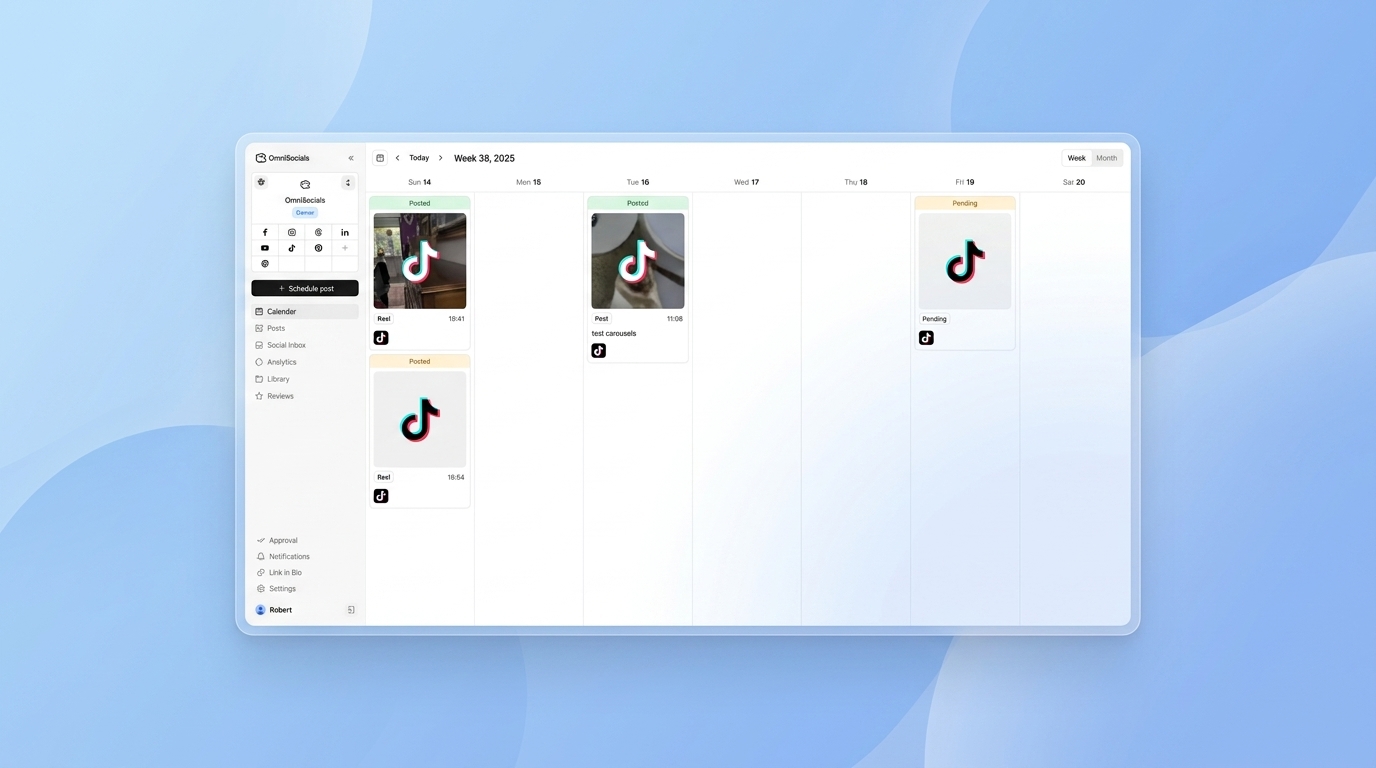
OmniSocials wraps the TikTok Content Posting API (along with 10 other platforms) so you can schedule and publish TikTok videos from a single dashboard. No OAuth implementation, no upload logic, no polling. You connect your TikTok account once via a secure OAuth flow handled server-side, and publish directly from the post editor.
It's $10/mo flat, supports TikTok alongside Instagram, YouTube, LinkedIn, and more, and has a public API if you want to trigger posts programmatically without building the TikTok integration yourself.
For teams that need direct API control, the steps above are what you need. For teams that want TikTok publishing without the integration overhead, OmniSocials is the faster path. You can also compare scheduling tools directly in our TikTok post scheduler comparison.
Frequently Asked Questions
Does TikTok have an API for posting videos?
Yes. TikTok's Content Posting API (part of the TikTok for Developers platform) lets approved apps upload and publish videos on behalf of users. You need a developer account, an approved app, and OAuth 2.0 authorization from each user before you can post.
What scopes do I need to post to TikTok via API?
To post videos you need the video.publish scope. If you also want to upload without immediately publishing (draft mode), you need video.upload. Both require your app to have the Content Posting API product enabled and approved in the TikTok developer portal.
What video formats does the TikTok API accept?
The TikTok Content Posting API accepts MP4 and WebM video files. Maximum file size is 4GB. Videos must be between 3 seconds and 60 minutes long, and TikTok recommends a 9:16 aspect ratio (1080x1920px) for vertical content.
How long does TikTok API approval take?
TikTok's app review process typically takes 5 to 15 business days. You submit your app with a description of how you use each scope, a demo video, and a privacy policy. Rejections are common on the first submission. Be specific about your use case.
Can I post to TikTok without building the API myself?
If you need to schedule and publish TikTok posts without building your own API integration, tools like OmniSocials handle the OAuth flow and API calls for you. It supports TikTok alongside 10 other platforms from a single dashboard for $10/mo.